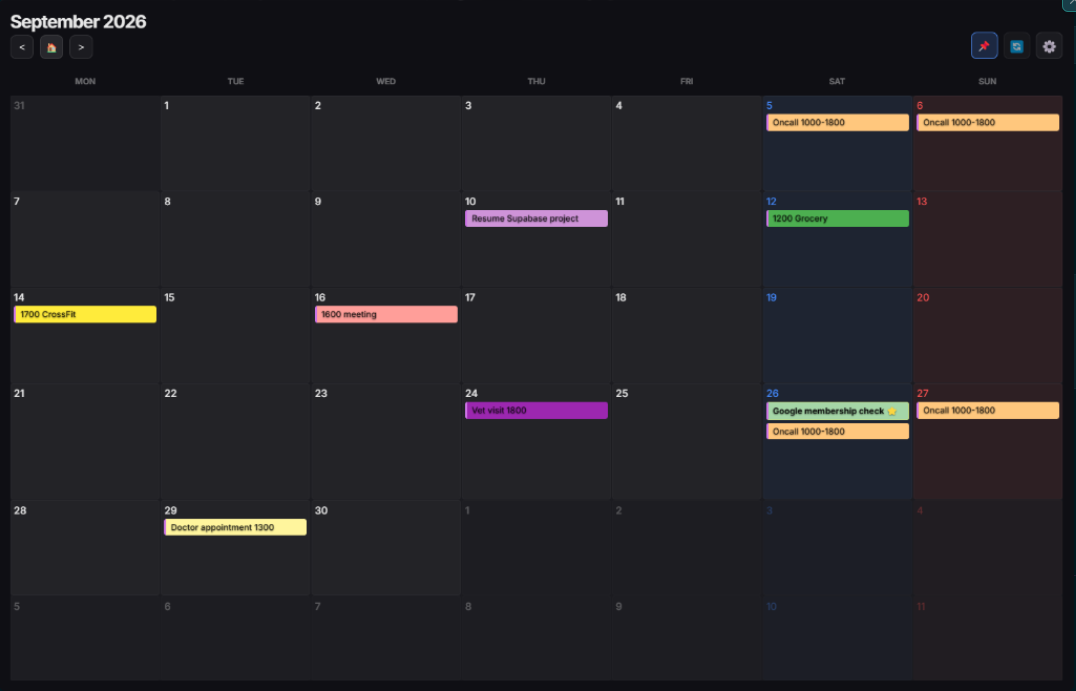
📅 Monthly ViewClean monthly overview with color tagging
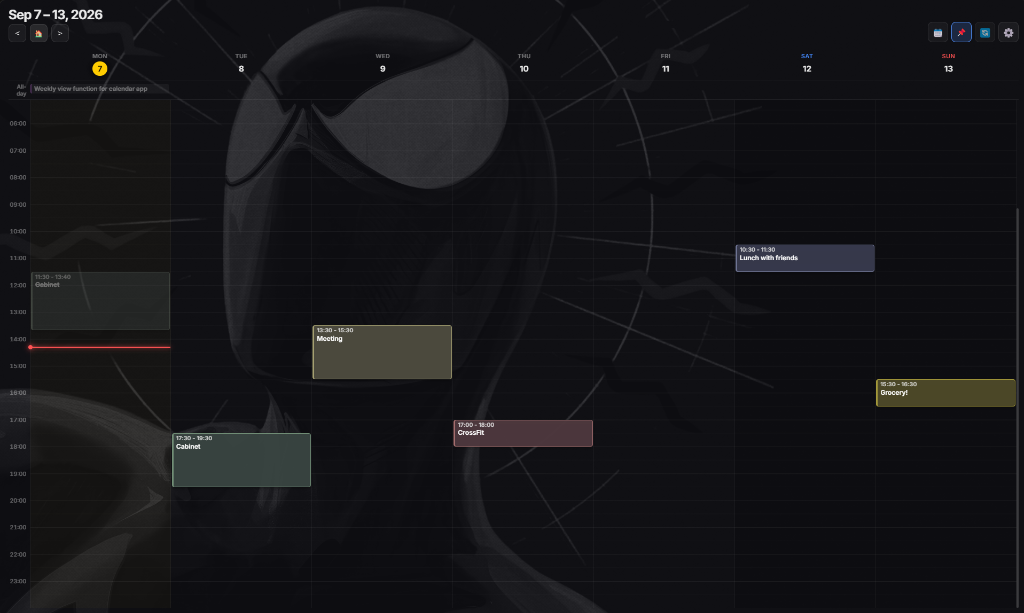
📆 Weekly Timeline v1.5 New24h vertical timeline with duration blocks
Features
Designed for Focus
Minimalist tools that stay out of your way — and your line of sight.
✨
Aero Glass UI
Beautifully translucent design that fits right into your workspace without stealing the spotlight.
👥
Multi-Account Sync
Connect multiple personal and work Google accounts with independent toggling and unified calendar view.
🎨
10 Pastel Colorways
Categorize your events with 10 curated pastel colors and customize your Today neon highlight.
🔄
Two-way Sync
Always in sync with Google Calendar. Changes made here reflect everywhere, instantly.
📅
Simple Scheduling
Click and add your event — it lands on Google Calendar with the correct timezone, automatically.
🔗
Magic URLs
One click to jump into Google Meet, Zoom, or event details. Built for efficiency.
In Action
Real data, live on your desktop
Syncs directly with your Google Calendar. What you see here is what you've got.
Real Google Calendar data — always on your desktop.
Community
Loved by Desktop Minimalists
Real feedback from users who keep Calendar-On-Demand pinned all day.
"
Customizability, local storage, not bloated, transparency with the creator and process, openness to user feedback.
Desktop Power User
Productivity Enthusiast · Tally
"
Aero Glass Google Calendar widget for Windows desktop is a clever idea.
Zvonimir Sabljic
Founder of Pazi · Product Hunt
"
I love this app, now I can pin my google calendar on my desktop.
Windows Desktop User
Verified Tally Review
"
The view on the events. Web interface of GC is difficult to see timed events while all day events are prominent.
Google Calendar User
Verified Tally Review
"
The aesthetic is cool and the quick sync with google calendar is awesome. Very cool app!
Community Review
Verified Tally Review
"
Beautiful and uses all my calendars
Multi-Calendar User
Verified Tally Review
"
The program is very useful and user-friendly. Beautiful, fast, and stays completely out of the way!
Community Review
Verified User
"
Customizability, local storage, not bloated, transparency with the creator and process, openness to user feedback.
Desktop Power User
Productivity Enthusiast · Tally
"
Aero Glass Google Calendar widget for Windows desktop is a clever idea.
Zvonimir Sabljic
Founder of Pazi · Product Hunt
"
I love this app, now I can pin my google calendar on my desktop.
Windows Desktop User
Verified Tally Review
"
The view on the events. Web interface of GC is difficult to see timed events while all day events are prominent.
Google Calendar User
Verified Tally Review
"
The aesthetic is cool and the quick sync with google calendar is awesome. Very cool app!
Community Review
Verified Tally Review
"
Beautiful and uses all my calendars
Multi-Calendar User
Verified Tally Review
"
The program is very useful and user-friendly. Beautiful, fast, and stays completely out of the way!
Community Review
Verified User
Changelog
What's New
A running log of improvements, fixes, and new features.
v1.6.0 Oct 16, 2026NEW
Tasks Drawer, Drag & Drop Time-blocking & Smart Sync:
Local Tasks Drawer (Alt+T): Built-in lightweight, distraction-free desktop todo list drawer. Add, edit, check off, and delete tasks instantly with real-time active counter badges and filter tabs (All / Active / Done). 100% offline-first local persistence.
Drag & Drop Time-blocking: Seamlessly drag any task from the drawer directly onto Month day cells (for all-day/flexible events) or Weekly Timeline hourly slots to instantly schedule your day without manual typing.
Smart Multi-Day Completion Sync: Checking off an event on the calendar automatically completes the task in the drawer once all scheduled sessions are finished. Scheduled a task across multiple days? The task stays active until the final session is checked.
Safe Event Deletion: Removing a scheduled time block from the calendar cancels the time slot while safely preserving the task in your drawer for future rescheduling.
UI Polish & Parser Fixes: Re-engineered the Settings modal with zero horizontal overflow and full Logout button visibility. Fixed natural language time parsing regex to prevent trailing text truncation (e.g. Test 1500).
v1.5.7 Sep 30, 2026
Global Toggle Hotkey Presets & Zero-Drift Desktop Positioning:
Customizable Global Toggle Hotkeys: Added curated hotkey presets in Settings (Ctrl+Shift+C, Alt+C, Ctrl+Alt+C, Alt+Space, None) with native macOS (Cmd) adaptation. Instantly pops the widget above active windows and drops it back down to the desktop without manual clicks.
Zero-Drift Startup Window Positioning: Eliminated multi-pixel coordinate drifting on system boot and restart by suppressing fractional DPI settling events during a 1500ms grace period and enforcing precise rounded coordinate locking.
Quality Assurance & Focus Reliability: Seamlessly returns OS window focus to previous background applications when dismissed from foreground, verified against strict ESLint static analysis.
Fixed Timezone Offset Scope in Event Creation: Corrected missing offset declaration in saveCurrentEvent() that caused timed events to throw a ReferenceError upon save.
Hardened Modal Auto-Save Exception Handling: Wrapped handleAutoSaveAndClose() in guaranteed try...finally to ensure the modal closes and state resets cleanly upon outside click regardless of API status.
Precision Monochrome SVG Vector Icons: Replaced all legacy header emojis with crisp 18px monochrome SVG line icons (Navigation, Today, Week/Month View Toggle, Position Lock, and Settings) on tactile glass buttons with specular rim highlights.
Ambient Hover Glows: Added subtle glass rim highlights and ambient accent glow to Month day cells, event tiles, and timeline cards, elevating the widget's physical desktop presence.
Luminous Current-Time Indicator: Upgraded the Weekly Timeline's red Now Line and origin indicator dot with a dual-stage luminous neon glow for effortless at-a-glance time orientation.
Settings Panel Consistency & Dark Glass Dropdowns: Standardized all dropdown selectors (Default View, Event Time Style, Start of Week) to custom dark glass dropdowns with clean chevron arrows. Re-engineered the + Add Account button with a sleek dashed border and glowing glass styling.
Pixel-Perfect Right-Aligned Toggle Switches: Standardized all switch components across Behavior, Accounts, and Calendars to guarantee razor-straight right-edge vertical alignment regardless of label length.
Multi-Day All-Day Events (Google Calendar Parity): Seamlessly visualizes multi-day all-day events across continuous day cells in both Month Grid and Weekly Timeline (top all-day row) with high-contrast dual dashed ribbons (multi-day-start, multi-day-middle, multi-day-end).
Dedicated Date Range Selector: Added a clean date range picker (Date [Start] ~ [End]) directly into the Add/Edit task modal with auto-enforced all-day mode for multi-day spans.
Anti-Truncation 2-Line Todo Layout: Re-architected task list items into a 2-line layout, giving event titles 100% width while placing time badges, account tags, and video meeting join buttons into a compact sub-row.
Bright Wallpaper Legibility: Upgraded day headers (MON, TUE, WED...) from 40% to 85% opacity (--text-muted) with 700 bold weight and weekend accents (Sun: #ff5252, Sat: #448aff). Added high-contrast backdrop tracks to the Weekly Timeline hour gutter and adaptive drop shadows (--label-shadow) for crisp readability over bright or white wallpapers.
Instant 0ms Optimistic Navigation: Eliminates network latency lag when browsing between weeks/months via instant 0ms DOM updates paired with debounced background synchronization and race-condition safety.
v1.5.3 Sep 22, 2026
Google Calendar 24 Official Colorways, Adaptive Contrast Typography & Time Picker Auto-Save:
Google Calendar 24 Official Colorways: Integrated Google Calendar's native eventLabelVersion: 1 API supporting all 24 official colorways (including Cocoa) with full two-way sync and clean 24-color grid selection in the Quick Add modal.
Zero Title Tag Pollution: Replaced legacy [COLOR:#hex] tags with native event label IDs, keeping event titles clean across Google Calendar web, mobile apps, and widget.
Adaptive Contrast Typography: Dynamic luminance calculations ensure bold dark text (#18181b) on bright/medium badges and crisp white text on deep dark badges for peak readability.
Time Picker Layout & Auto-Save Polish: Expanded time picker inputs to eliminate 12h/24h text truncation, and fixed auto-save detection so modifying only event times reliably persists on blur.
First-Launch Center & Frontmost Focus: Guaranteed that the calendar widget spawns dead center on the primary display and pops in front of full-screen windows on first launch.
Off-Screen Display Protection: Added multi-monitor validation using active display bounds to detect disconnected external monitors or corrupted coordinates, automatically rescuing and resetting the window position.
Second-Instance Auto-Rescue: Re-launching the app via desktop shortcut automatically rescues any off-screen window, restores minimized states, and brings it directly into focus.
Desktop Notifications: Stay on schedule with native desktop alerts. Configure reminders in Settings (5m, 10m, 15m, or 30m before upcoming events).
Cross-Midnight Event Continuity: Seamlessly visualizes overnight events across day boundaries with matching dashed borders and continuation arrows (→ / ↩) in both Weekly Timeline and Month Grid views.
Overnight Event Creation Fix: Fixed Google API event creation error for events ending after midnight by automatically scheduling the end time to the next day.
Buy Me a Coffee (Ko-fi): Added a discreet support button in Settings for users wishing to support ongoing development. ☕
Reliability Polish: Timezone boundary safety improvements via localized date conversions.
v1.5.0 Sep 07, 2026Major
Weekly Timeline View & Smart Time Customization:
Google Calendar-Style Weekly Timeline: 24-hour vertical timeline grid with accurate duration block heights, automatic overlapping event cluster columns, top all-day event row, real-time red current time indicator line, and smart auto-scroll.
Seamless View Toggle: Quick header icon toggle (📅/📆) and keyboard shortcuts (W for Week, M for Month) with customizable default view in Settings.
Event Micro-Time Display: New customizable time styling in Settings (Micro-time on top 11:30 ~ 13:40, Start time only, or Compact duration) with contrast-safe adaptive text.
End Time Retention Fix: Preserves user-customized durations when adjusting start times or quick typing tasks.
Window Min-Size Enforcement: Fixed Windows frameless drag resize bypass with rigid 370×430 minimum size limits and flexible 7-column grid scaling.
v1.4.1 Aug 31, 2026
Direct Time Picker & Smart Time Visibility:
Direct Time Picker: Easily set event start and end times directly with an All-day toggle chip and time picker inputs.
Event Time Display: Added automatic time prefixes to calendar grid items and smart time badges to task lists.
Smart Title De-duplication: Automatically cleans up duplicate time strings in event titles for existing and new tasks.
v1.4.0 Aug 29, 2026Major
Multi-Account Sync & Major Customization Update:
Multi-Account Support: Connect and sync multiple Google accounts simultaneously with per-account toggles, badges, and hover tooltips.
Custom Today Highlight: Choose any custom neon color for the today indicator in Settings > Appearance.
Sound Effects Toggle: Added option to mute completion chimes in Settings > Behavior.
Native OS Dragging: Fast, zero-latency window dragging with draggable header bar.
Responsive Grid Resizing: Calendar cells proportionally adjust on window resize, preventing cutoffs on smaller dimensions.
Window Position Drift Fix: Window bounds and DPI scaling preserved precisely across reboots.
v1.3.13 Aug 22, 2026
Fix: Removed forced account chooser screen during automatic Google login.
v1.3.10 Aug 21, 2026
Fix: Crash on consecutive requests to OAuth server.
v1.3.6 Aug 21, 2026Security
Migrated Google OAuth flow from embedded popup to the System Default Browser. Complies with Google's latest security policies blocking OAuth in embedded webviews.
v1.0.9 Jul 25, 2026
Added in-app update notification indicators. Implemented clickable updates to trigger instant quit-and-install from the widget.
v1.0.8 Jul 25, 2026
Optimized background sync interval to 15 minutes. Added exponential backoff retry (1m → 2m → 4m → 15m) for API errors.
v1.0.7 Jun 27, 2026
Enabled automatic update checks on startup. Updated release script to upload metadata to GitHub.
v1.0.4 Jun 27, 2026
Fixed window sizing bug with position locking. Resolved blank white auth window flashing on sleep-wakeup.
v1.0.2 Jun 20, 2026
Added sound feedback on task completion. Updated UI to glass-morphism with micro-animations.
v1.0.0 Apr 1, 2026
Initial public release.
FAQ
Frequently Asked Questions
Everything you need to know about Calendar-On-Demand, privacy, and how it compares to other calendar tools.
What is Calendar-On-Demand?
Calendar-On-Demand is a lightweight, distraction-free desktop widget for Windows and macOS. It keeps your Google Calendar and Google Tasks always visible on your screen or pinned to your desktop background—saving you from keeping browser tabs open or constantly alt-tabbing.
How does it differ from Notion Calendar or Google Calendar Web?
Unlike Notion Calendar or web calendar tabs that require opening heavy, full-size windows and switching focus away from your active work, Calendar-On-Demand sits unobtrusively on your desktop or stays pinned always-on-top. It consumes minimal RAM, updates in real time, and lets you glance at or manage your schedule with zero clicks.
Is Calendar-On-Demand free and open source?
Yes, Calendar-On-Demand is 100% free and open source under the MIT license. There are no subscriptions, paywalls, or feature locks. The entire source code is openly hosted on GitHub.
Is my Google account data secure and private?
Yes. Calendar-On-Demand authenticates directly with Google APIs using official OAuth 2.0 through your system's default browser. OAuth tokens and cached calendar entries remain strictly on your local device. We never run a backend database that collects your events, emails, or personal information.
Can I connect multiple Google accounts?
Yes. You can connect multiple Google accounts (e.g. personal and work) and choose which calendars to display or hide, letting you see all your commitments in a single unified view.
Does it support two-way synchronization?
Yes. Any event or Google Task you add, edit, or complete inside Calendar-On-Demand immediately syncs back to your Google Calendar. Any events added from your phone or web browser also sync down to the desktop widget automatically.
Which operating systems are supported?
Calendar-On-Demand is fully supported on Windows 10 & 11 (64-bit) as an installer/portable app, and on macOS (Apple Silicon M1/M2/M3/M4 & Intel) as a .dmg image.
Can I customize the widget position, size, and transparency?
Yes. You can drag and resize the widget freely, pin it to stay always on top, lock its position so it never moves accidentally, or attach it to your desktop background. Opacity and dark glassmorphic styling can also be fine-tuned.
Follow these quick steps to get Calendar-On-Demand running smoothly on your Mac.
1
Drag to Applications
Open the downloaded .dmg file, and drag the Calendar-On-Demand icon into your Applications folder.
2
One-time Gatekeeper Bypass
Because this app is free and not signed through Apple's paid developer program ($99/year), macOS will block it on first launch. To unlock safely, open Terminal (⌘ + Space → type "Terminal") and run:
xattr -cr /Applications/Calendar-On-Demand.app
3
Ready to Launch!
Launch Calendar-On-Demand from Spotlight (⌘ + Space) or your Applications folder. When updating to new releases in the future, simply replace the app and re-run the command once.